

Size guide
Birthday Invitation Size for Print and Group Chats
Updated
Short answer
Print birthday invitations at 5×7 in with 0.125 in bleed (5.25×7.25 in at 300 DPI), slip them into A7 envelopes for classroom handouts, or send a 1080×1500 px JPG in the parents' group chat. At home, print at 100% on card stock and trim.
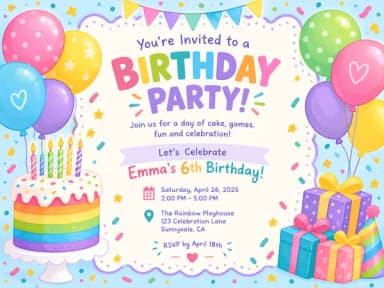
Make it with PiCraft
Birthday Invitation Maker
Themed birthday invitations for kids and adults, printable at 5×7 or shareable by text.
Birthday invitation sizes at a glance
Kids' party invites use the same print footprint as many greeting cards: a 5×7 in card after trimming. That size is easy for children to carry home from school and large enough for a theme illustration plus date, time and place.
| Use | Size | Notes |
|---|---|---|
| Printed card (trim) | 5×7 in | Standard flat invitation |
| Print file with bleed | 5.25×7.25 in at 300 DPI | 0.125 in bleed on every side |
| Pixels at 300 DPI with bleed | 1575×2175 px | For JPG uploads to print shops |
| Envelope | A7, 5¼×7¼ in | Fits a 5×7 in card |
| Text / WhatsApp / email | 1080×1500 px JPG | Portrait share image, not for print |
| Home printer sheet | 8.5×11 in letter | Print at actual size, then trim |
Printing at home on 8.5×11 in paper
Download the 300 DPI print JPG or PDF. In your printer dialog, choose actual size or 100% scale so the artwork prints at 5×7 in, not "fit to page." Use card stock if your printer accepts it; plain paper works for a draft.
Home printers rarely print edge to edge, so expect a thin white margin on one or more sides even when the file includes bleed. Trim to the outer edge of the design with a paper cutter or sharp scissors. PiCraft's illustrated cards are meant to be trimmed; they are not mockups with a fake border.
Two invitations can fit on one letter sheet if you place them side by side in a photo or print layout app. Leave enough gap between copies to cut cleanly. For a class of twenty, a local copy shop is often faster and gives more consistent color than a home inkjet.
Print shop vs home: what changes
A print shop trims to exactly 5×7 in, can run heavy card stock and may score folds if you add a back panel later in another tool. Give them the PDF with bleed and tell them the finished size is 5×7 in.
Home printing saves time for a handful of invites and last-minute pool parties. Proof one copy before you print twenty. Check the honoree's name, age line, date and address against your calendar app.
Order A7 envelopes if mailed invites matter; for classroom-only handouts, an unsealed card is enough.
Classroom handouts and party safety
- Put the venue name and street on the card, but consider sharing gate codes or apartment numbers only in the chat.
- Keep the time range clear (for example "2:00 – 5:00 PM") so parents know pickup expectations.
- Use the RSVP line for one contact name and phone number; remember everyone who gets the image can see it.
- For food-allergy notes, follow your school's policy. PiCraft does not add allergy icons or separate disclaimer blocks.
Themes such as dinosaurs, unicorns or space are illustrated artwork only; this maker does not place a photo of the birthday child on the card.
Common mistakes for birthday invites
- Shrinking the print file to "fit page," which makes the card smaller than 5×7 in.
- Sending the share JPG to a printer and getting a soft or pixelated result.
- Crowding the place field with a long address when a park pavilion name would do.
- Forgetting to test the share image on a phone before posting it to a large group.
- Buying the wrong envelope size (A7 fits 5×7 in; smaller A6 envelopes do not).
Make a birthday invitation at the right size
The Birthday Invitation Maker fills in the party details on a themed 5×7 in design. You get a print PDF and 300 DPI JPG with 0.125 in bleed, plus a 1080×1500 px share image. The opening line "You're invited!" is fixed in English; there is no photo upload.
Formal weddings use the same print dimensions; see wedding invitation size. For a community poster instead of a card, try flyer size and the Event Flyer Maker.
Frequently asked questions
What size are printable birthday invitations?+
5×7 in after trim, with a 5.25×7.25 in file at 300 DPI when you include 0.125 in bleed on each side.
What size should a birthday invitation be for text or WhatsApp?+
1080×1500 px portrait JPG. It is for screens, not for professional printing at 300 DPI.
What envelope fits a 5×7 in birthday invitation?+
An A7 envelope, 5¼×7¼ in, the same size used for greeting cards and wedding invitations.
Can I print two invitations on one sheet?+
Yes. Print at 100% scale and arrange two 5×7 in copies side by side on 8.5×11 in card stock, then cut between them.
Will home printing include bleed to the edge?+
Usually not. Most home printers leave a white margin. Trim to the artwork edge or use a print shop for full-bleed card stock.
Can I add a photo of my child on the invitation?+
Not in PiCraft's birthday maker. Invites are illustrated themes so the text layout stays reliable.
Sources
Platforms change their requirements, so check the official page before you submit a file.
Ready to make one?
Birthday Invitation Maker
Themed birthday invitations for kids and adults, printable at 5×7 or shareable by text.
Related guides
Wedding Invitation Size and Print Specs
Standard wedding invitation size is 5×7 in with 0.125 in bleed, 300 DPI and an A7 envelope. Trim, safe area, pixels, card stock and share-image sizes.
Size guideEvent Flyer Size for Print and Social Media
Event flyer sizes: US Letter 8.5×11 in with bleed for print, 1080×1350 px feed posts, 1080×1920 px Stories, and A4 dimensions in millimeters.
Makers that help
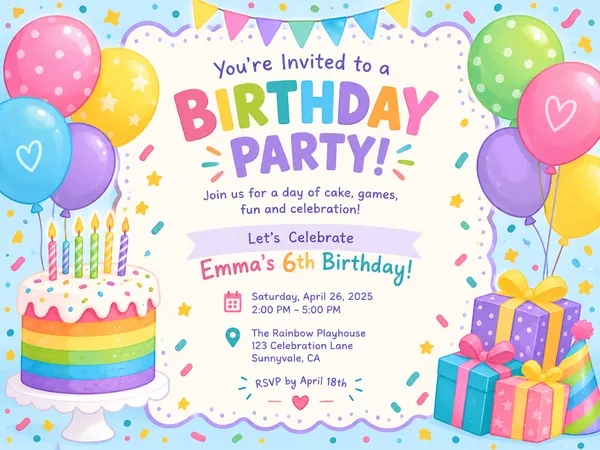
Birthday Invitation Maker
Themed birthday invitations for kids and adults, printable at 5×7 or shareable by text.
Wedding Invitation Maker
Printable 5×7 wedding invitations with your names, date and venue, plus a phone-ready version.
Sticker Maker
Die-cut sticker designs with a white border, exported as transparent PNGs.

Event Flyer Maker
Posters and flyers for parties, gigs and community events, for print and Instagram.