

Photo trends
How to Do the AI 80s Photo Trend (With a Prompt or in One Click)
By the PiCraft team · Updated
In short
The AI 80s photo trend redoes a modern photo as a 1980s film snapshot: bigger hair, period clothes, direct flash, faded warm color and often a date stamp. Upload one clear photo to a chat image tool and paste a prompt that asks for those details, or pick the 80s Flashback look on PiCraft and download a finished JPG.
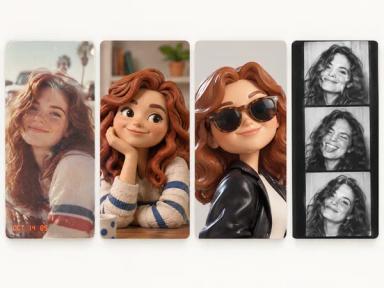
Make it with PiCraft
Photo Trend Maker
What the AI 80s photo trend is
You take a modern photo and have an AI image tool redo it as if it had been taken in the 1980s. SocialThink, in a roundup dated September 14, 2026, lists what the change can include: 1980s clothing, voluminous hairstyles, statement jewelry, vintage studio backgrounds, warm lighting, film grain and soft focus. It adds that this is not just a sepia filter, because the AI reinterprets the whole scene.
Quantslant, in its trend generator dated October 4, 2026, lists the 80s and 90s together and mentions an optional date stamp in the corner, like the ones an analog camera printed. The details people recognize first are the flash, the faded color and that stamp.
Method 1: a prompt in ChatGPT or Gemini
Any chat image tool that accepts a photo can attempt this. The steps are the same in each.
- Pick one clear photo of yourself, a friend or a couple. A relaxed snapshot in ordinary clothes works better than a posed studio portrait.
- Open the chat tool, add the photo and paste the prompt below.
- Add the shape at the end of the prompt: “vertical 9:16” for Stories and Reels, “2:3” for Pinterest or “3:4” for a feed post.
- Make two or three versions. Faces drift between runs, so keep the one that still looks like you.
- Fix one thing at a time with a short follow-up, such as “keep everything the same, only make the date stamp smaller”.
The prompt: “Use the photo I upload as the reference and keep me recognizable: same face shape, features, skin tone, age and hair color. Restyle it as an authentic snapshot from the mid-1980s. Change my hair, clothes, accessories and surroundings to unmistakable 1980s fashion and interiors: bold shapes, bright accessories, layered textures. Shoot it like consumer film with direct on-camera flash, faded warm colors, visible grain and slight softness. Add a small orange-red date stamp in a lower corner, set to a date in 1985. No readable posters and no modern objects.”
It is adapted from the description PiCraft sends to its image model for the 80s look. We have not measured how it behaves in every chat tool, and each run is different, so expect to try it more than once.
What to change in the prompt
- Keep your own clothes: delete the sentence about hair, clothes and accessories. The look then rests on flash, fade and grain.
- Get a stronger fade: add “slightly overexposed, washed-out warm colors”. For a cleaner picture, say “light grain” instead of “visible grain”.
- Control the stamp: write the exact text you want, such as “SEP 14 ’85”, and say which corner. Quantslant notes that text of one to three words comes out correctly more often than long sentences.
- Make a couple or two friends: say “two people standing close together” and upload one photo in which both faces are clear. PromptLike says the line that keeps your face the same does most of the work, so keep it near the start.
Method 2: one click on PiCraft
The 80s Flashback look has the description above built in, so there is nothing to write.
- Open the 80s Flashback page and upload one photo.
- Choose a size: 3:4 or 2:3 for a print-like frame, 9:16 for a full-screen story.
- Create the picture and download the JPG at the exact pixel size.
- Read the date stamp, and generate again if a digit looks wrong.
New visitors get free credits and do not need an account. One credit makes one picture, whichever look and size you choose, and a failed run returns the credit. The same photo can go through other looks in the Photo Trend Maker, such as the 70s Slide Portrait for a warmer, softer slide look or the Y2K Digital Camera look for harsh early-2000s flash.
Which photo to use
The more everyday the original, the more convincing the snapshot feels. A selfie by a window in daylight, two friends laughing at a table or a couple on a sofa all work. A single face or two people keep the likeness best, and large groups drift, so crop to the people who matter. The guide to the best source photos covers the other looks too.
Fixing common problems
| Problem | Likely reason | What to try |
|---|---|---|
| The date stamp is missing or wrong | The AI sometimes places it differently, leaves it out or draws a wrong digit | Generate again, and read the stamp before you post. It is part of the image, so you cannot edit it afterwards |
| Your own clothes disappeared | The look is built to replace hair, clothes and the room | Remove the clothes sentence in a prompt, or pick a look that keeps them, such as Night Out Flash |
| The face looks different | A small face, a side view or a dark photo | Use a closer, sharper, front-facing photo and keep the line about keeping your face unchanged |
| It looks too clean | The prompt did not name the flash, grain or fade clearly | Ask for direct on-camera flash, visible grain and faded warm color in the same message |
| A group photo drifted | More faces give the AI more to change | Crop to one or two people |
Zoom in on hands and small accessories before you post. These are the places where AI most often goes wrong.
Before you post it
Upload the downloaded JPG itself instead of a screenshot, so the platform does not compress the picture twice. Use only photos you took or have the right to use, get permission from anyone recognizable in the picture, and do not upload photos of children. For other looks that are going around this month, see what people are posting right now.
Frequently asked questions
What is the AI 80s photo trend?+
It is the habit of turning a modern photo into a picture that looks like a 1980s film snapshot, with period clothes, big hair, flash, faded color and sometimes a date stamp. SocialThink described it in September 2026 as one of the styles getting attention on Instagram.
How do I make an 80s AI photo for free?+
Upload one clear photo to a chat image tool that has a free tier, such as ChatGPT or Gemini, and paste a prompt like the one above. Free limits can change. On PiCraft, new visitors get free credits and no account is needed.
What is a good prompt for the 80s photo trend?+
One that names the decade, the flash, the film fade, what should change and what should stay. The full version is in the guide above. A short request such as “make it 80s” leaves those choices to the model.
Can I do the 80s trend with a partner or friends?+
Yes. Use one photo in which both faces are clear and close together, and say two people in the prompt. Two people keep the likeness better than a big group.
Why is the date stamp wrong or missing?+
The stamp is drawn by the AI like the rest of the picture, so digits can come out wrong, or it can move to another corner or disappear. Generate again, or write the exact text and corner in your prompt.
Is it safe to upload my photo?+
Upload only photos you took or have the right to use, and only if everyone recognizable has agreed. Do not upload photos of children. The Privacy Policy explains how PiCraft handles uploaded photos.
Sources
Platforms change their requirements, so check the official page before you submit a file.
Ready to make one?
Photo Trend Maker