

Photo trends
The Best Photo to Upload for AI Photo Trends, Look by Look
By the PiCraft team · Updated
In short
Use one sharp photo in even light, with the face or the pet filling a good part of the frame and nothing covering it. After that, match the photo to the look: a casual snapshot for film looks, a close portrait for clay and toy looks, a waist-up photo for the figure box and the pop-out, and a pet with a clear coat color for felt, paper and sticker looks.
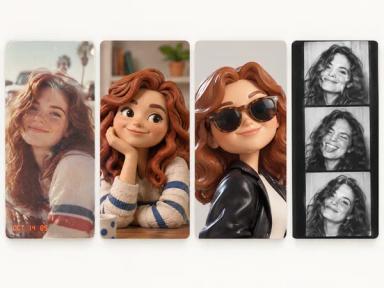
Make it with PiCraft
Photo Trend Maker
Five rules that apply to every look
- Start with a sharp, evenly lit photo. Window light and daylight work best. A blurry, very dark or heavily filtered photo gives the AI little to hold on to, and the result drifts further from the original.
- Make the face or the pet large. A close crop or a waist-up shot keeps the likeness better than a wide scene where the subject is small. Crop the photo first if you need to.
- Use one subject unless the look is built for two. A single face or a pair keeps the likeness best, and large groups drift more.
- Keep the face clear. PromptLike lists sunglasses, a cap over the forehead and a heavy filter as things to avoid, and says dark and blurry photos are the number one reason a face changes. Quantslant adds that a hat in a figure photo can end up on the figure for good.
- Dress and pose the way you want to look. Quantslant notes that the model carries clothing over in an action figure. Some PiCraft looks replace clothes on purpose, which the table below points out.
Choose the size before you create. The shape changes how the picture is composed, so a 9:16 image is built for a tall frame instead of being cropped from a square. The Photo Trend Maker shows all four sizes.
Which photo each look needs
The advice below is the same advice printed on each look page, collected in one place. Open a look page to see its examples and its prompt.
| Look | Best photo to upload | Photo to avoid |
|---|---|---|
| 80s Flashback | A casual shot in ordinary clothes, such as a selfie by a window | A posed studio portrait, which feels less like a snapshot |
| 70s Slide Portrait | A relaxed daylight or window-light photo | Evening and flash photos, which have hard shadows to work around |
| Y2K Digital Camera | A sharp photo with the face large in the frame | A small face in a wide scene, which can lose its likeness under the flash |
| Photo Booth Strip | A front-facing photo on a simple background, alone or as a pair | A busy background, which only adds noise to the grain |
| Claymation World | A subject with a clear outline and some room around it | A crowded scene with no clear subject |
| Felt Miniature | Distinct fur, hair or clothing colors on a simple scene | A cluttered room, which turns into a pile of fibers |
| Collectible Figure Box | A waist-up or full-body photo that shows the outfit | A tight selfie, which leaves the clothes and accessories to be guessed |
| Pop-up Paper Card | One clear subject on a plain background, such as a pet with a distinct coat | A crowded room, which becomes a busy stack of layers |
| Scrapbook Journal Page | A sharp photo with a clear focus, such as a day out or a couple | A tiny subject in a wide scene, which becomes a tiny figure on a small print |
| Mini Doodle Twin | A close photo where a shoulder, hat or table edge is visible | A very tight face crop, which leaves the twin nowhere to sit |
| Instant Photo Pop-Out | A waist-up photo where the shoulders and one arm show | A tight face crop, which forces the AI to invent the arm |
| Photo Sticker Sheet | A sharp, front-facing photo with eyes, ears and hair visible | A blurry or angled photo, because nine copies repeat its flaws |
| Night Out Flash | A clear face, large in the frame | A photo whose setting you want to keep, since the background goes dark and moody |
| Chibi Character | A photo that shows the hairstyle, glasses and outfit, of one person, a couple or a pet looking at the camera | A group of three or more, because each face shrinks and the likenesses drift |
| Color-Pop Sweater Portrait | A sharp chest-up photo facing the camera, with open eyes and the shoulders in frame | Sunglasses or a hand across the face, because the eyes are the whole likeness once the sleeves cover the mouth |
| Snow Triptych | A bright photo with the face large and the eyes open, of one person or one pet | A small face in a wide scene, because the top frame is an extreme close-up of the eyes |
| Neon City Game Poster | A sharp chest-up or full-length photo in daylight with the face clear, of one person, a couple or a pet | A tiny face in a wide scene, because the painting simplifies small details |
| Wanderlust Postcard Collage | A selfie or half-length photo with a large, smiling face, since it sits inside a small print | A distant full-body shot, where the face becomes too small to keep |
| Caricature Portrait | A photo with a strong expression and a clear hairstyle, of one person or a couple | A blank, neutral expression, which gives the AI little to exaggerate |
| Tarot Card Portrait | A sharp, front-facing photo from the chest up, or a pet looking at the camera | Sunglasses or a hat that hides the eyes, because the ink style simplifies the face |
| Cinematic Film Stills | A photo of one person or pet with a recognizable setting behind, such as a park or a kitchen | A plain wall or a very tight crop, which leaves nothing for the wide shot |
| Mouse-Drawn Scribble | A photo with clear hair color, glasses or a bright jacket, since the colors carry the joke | A busy background or a large group, because the doodle drops the background |
| Underwater Portrait | A sharp, front-facing photo from the chest up in even light, or a dog looking at the camera | Sunglasses, a hat or a turned-away face, because the water ripples already hide detail |
Photos of pets
Several looks suit pets better than people, and the photo rules are similar. The animal should be large, sharp and lit from the front, with the face visible.
- Clear markings carry over best. A patch, a stripe or a distinct coat color survives the move into felt, paper or ink.
- A pet that looks at the camera works best for the pop-out, where a front paw reaches out of the frame in place of a hand.
- A single animal on a simple background gives the paper card and the felt miniature clean shapes to work with.
- The sticker sheet adapts the nine poses for a pet, so a sharp front-facing photo matters even more, because the face is repeated nine times.
Couples and groups
Two people can work very well: the photo booth strip is built around a pair swapping places between frames. For a pair, use one photo in which both faces are clear and close together. PromptLike points out that couple edits are the hardest for any AI model, because it has to protect two faces at the same time.
Groups drift more than single faces. If three or more people are in the picture, crop it to the people who matter before you upload it. Get permission from everyone who can be recognized in the photo before you post the result.
Photos to skip
- Photos of children. The Terms say not to upload them, and the looks are not built for them.
- Someone else's photo without their agreement. Every recognizable person must have agreed to the photo being used.
- Photos with sunglasses, a hat over the forehead, or a hand across the face.
- Side-on, distant or low-light photos. Quantslant lists a side view, a long distance and a group as the usual reasons a face looks different in the result.
- Photos with personal details in the background, such as house numbers, license plates or documents. The result can keep them.
When the result does not look like you
Every generation is new, so the first result is a sample, not a verdict. PromptLike advises generating again with the same prompt before rewriting it, because the second or third try is often the cleanest. On PiCraft the same applies: run the same photo again, or run it through a different look.
If the face keeps drifting, change the photo before you change anything else. A sharper, closer, better-lit photo does more than extra words. Looks that turn you into an object, such as a bobblehead or a clay figure, are meant to look like a toy, so judge them by whether friends would recognize you, not by whether every detail matches. Our photo trends guide to what people are posting right now lists which looks are going around.
Frequently asked questions
What kind of photo works best for AI photo trends?+
One sharp photo in even light, with the face or the pet large in the frame and nothing covering it. Window light and daylight are the safest. Then pick a look that suits the photo, since a casual snapshot suits the film looks and a close portrait suits the clay and toy looks.
Should I use a full-body photo or a close-up?+
It depends on the look. A waist-up or full-body photo helps the collectible figure box and the pop-out, which need an outfit or an arm to copy. For most other looks, a close or waist-up photo keeps the likeness better than a wide scene where the subject is small.
Can I use a group photo?+
You can, but a single face or two people keep the likeness best. Large groups drift, so crop the photo to the people who matter. Make sure everyone in it has agreed to its use.
Can I use a photo of my dog or cat?+
Yes. Several looks suit pets, including the felt miniature, the pop-up paper card, the marble statue and the sticker sheet. Use a sharp photo with the animal large in the frame and its markings visible.
Can I upload a photo of my child?+
No. The Terms say not to upload photos of children. Use a photo of yourself, an adult who has agreed, or a pet.
Why does the result not look like me?+
The usual causes are a weak source photo, a small face in a wide scene, or a photo with sunglasses or a hat. Generate again, try a closer and better-lit photo, or switch to a look that suits your photo better. Every run gives a new result.
Sources
Platforms change their requirements, so check the official page before you submit a file.
Ready to make one?
Photo Trend Maker