

Pixel Art Sticker Maker
The pixel art style makes stickers in crisp 16-bit pixels with a limited color palette, like a sprite from an old console game. Every curve is made of small squares, and the effect is both retro and clean.
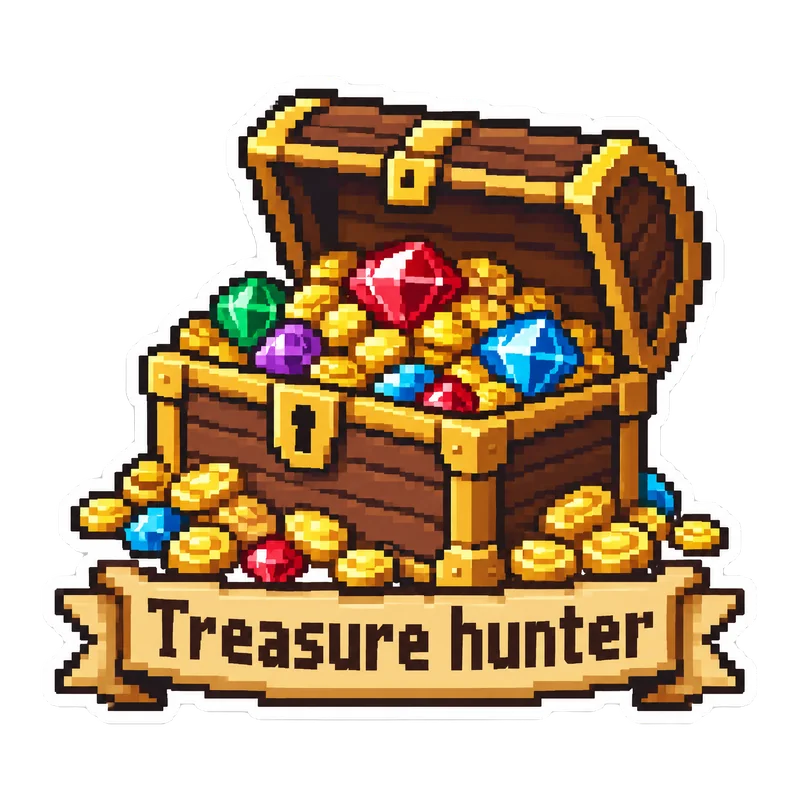
Describe what you want, such as an astronaut or a treasure chest, and PiCraft makes a pixel-style sticker with a white die-cut border. The PNG is transparent at 2048×2048 px, with a 3×3 inch print file.
This is the Pixel art style of the Sticker Maker. The form on this page opens with it already selected.
Pixel art examples

Who the Pixel art style suits
Gamer and developer gear
Pixel stickers feel at home on keyboards, game controllers and laptop lids covered in code stickers.
Streamer and community merch
A small pixel icon or mascot can become a recognizable part of a channel's brand.
Pixel-art fans of any age
The nostalgic look appeals to people who grew up with 8-bit and 16-bit games.
Getting the best Pixel art result
- 1
Choose a simple scene
Pixel art is strongest with a single character or object. A treasure chest overflowing with coins is easier to read than a complex landscape.
- 2
Use short, blocky text
A banner or a few letters, such as "Dream big", suits the style. Long text is likely to be garbled.
- 3
Scale down, not up
The print file is 900×900 px at 3 inches. Enlarging a pixel design softens its edges, so keep the sticker at or below the exported size.
- 4
Avoid trademarked sprites
Describe a generic character, such as a knight or a space explorer. Do not copy a game's protected characters.
Ideas to try
- Subject: "An astronaut planting a flower on the moon", text: "Dream big"
- Subject: "An open treasure chest overflowing with gems and coins", text: "Treasure hunter"
- Subject: "A tiny knight with a sword standing on a hill"
- Subject: "A pixel coffee cup with steam", text: "Loading"
What you download
Every design from the Sticker Maker comes with the files for the job, whichever style you choose:
- Transparent PNG 2048×2048
- Print PNG 3×3 in, 300 DPI
Questions about the Pixel art style
Will the pixels stay sharp when printed?+
At the exported print size they look clear. Scaling the print file up softens the edges, so scale down rather than up.
Is this the same as a sprite sheet?+
No. Each generation is one sticker design, not a set of animation frames.
How do I choose the colors?+
There is no color picker. The style uses a limited palette, and you can generate again for a different one.
What size should I print?+
2–3 inch stickers are the most common, and the 3×3 in file is ready at 300 DPI. For pixel art, scale down in your print software rather than up, so the edges stay crisp. Print one test before you order a large batch.
Sticker styles






Guides
Sticker Size and File Requirements
Sticker file sizes for print and cut: 300 DPI PNGs, common 2–3 in prints, die-cut vs kiss-cut, white borders, pixel math, and Cricut Design Space upload steps.
StickersHow to prepare sticker artwork for print and cutting
Prepare transparent PNG sticker art at print size, upload Flat Graphic files to Cricut Design Space, and test one sticker before a full Print Then Cut run.
Size guideAmazon Product Image Size and Main Image Rules
Amazon main image: pure white RGB 255, 85% fill, 1000 px minimum for zoom, 1600 px+ recommended, JPEG preferred, and what secondary images allow.